Samsung Gallery sync now stores Galaxy photos in Google storage
Samsung Gallery sync now stores photos and videos in your Google account, Samsung announced on Tuesday, November 10, starting with select Galaxy phones and tablets running One UI 9. The change lets Galaxy owners reach their photos across devices without a separate cloud account, and Samsung is adding a way to clear space on a full phone.
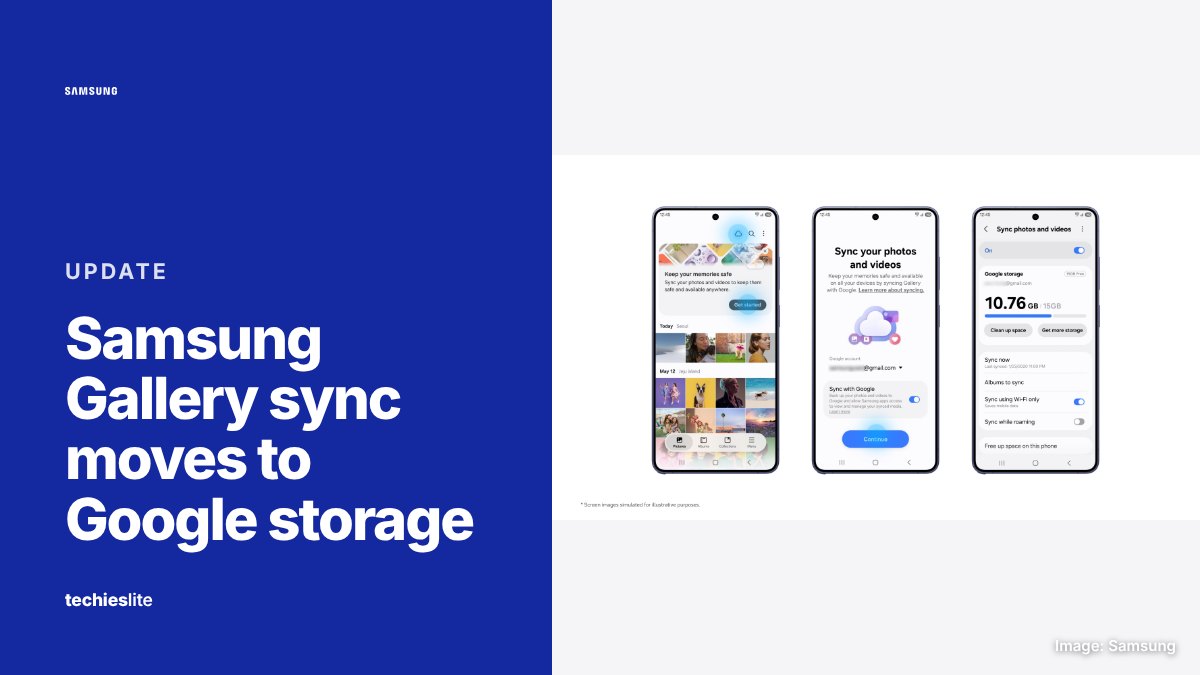
How Gallery sync with Google works
The sync runs inside the Samsung Gallery app, so there's no separate app or cloud account to create. If your Samsung and Google accounts are already set up on the device, you can turn it on by tapping the Cloud icon in Gallery, tapping "Get started" on the tip card or opening Gallery Settings and switching on "Sync photos and videos."
Once it's on, photos and videos you take on one Galaxy device show up in Gallery on the others. Samsung's example is shooting on a Galaxy phone and viewing the shots on a Galaxy tablet. Each device needs the same Samsung and Google accounts signed in, with sync turned on.
Setting up a new Galaxy device works the same way. Sign in with the accounts you used for Gallery sync before, turn on sync, and Gallery shows previews of your library while the originals stay in the cloud. You download an original only when you need it.
A new way to free up space
Samsung has also added a "Free up space on this phone" option. After photos and videos have synced to Google storage, it removes the original files from the device and keeps thumbnails in Gallery, so you can still browse them and download any item you need.
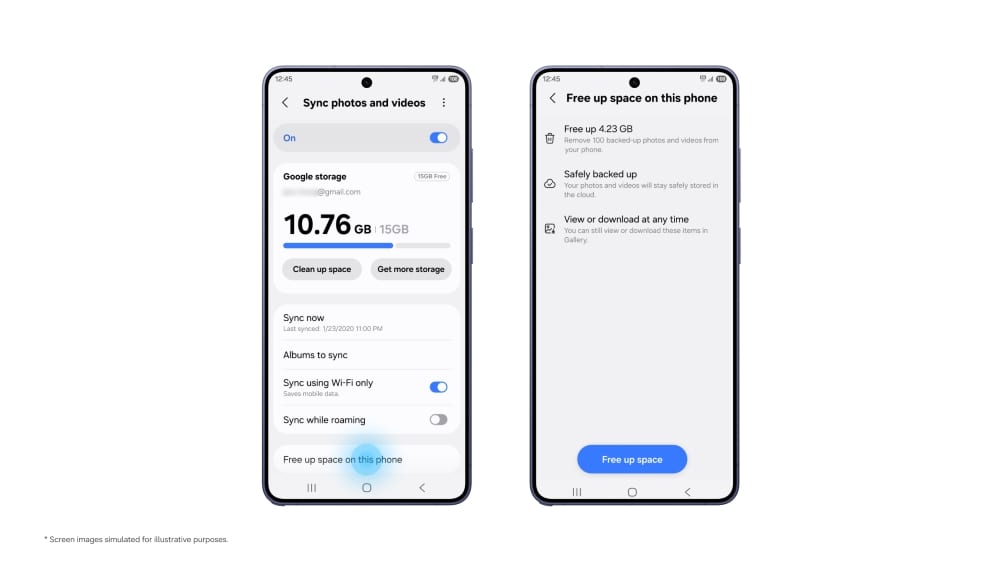
Deletions sync too. Samsung says deleting a synced item in Gallery also removes it from Google storage and from your other connected Galaxy devices.
Storage, older photos and OneDrive
Gallery sync draws on your Google account's existing storage, which it shares with Gmail, Google Drive and Google Photos. Google accounts include up to 15GB at no cost, and Samsung says Gallery sync doesn't add any extra allowance. More space requires a paid Google One plan.
At launch, Gallery only shows items synced through Gallery after you turn the feature on. Photos and videos already in your Google storage, such as an existing Google Photos library, stay in the cloud but don't appear in Gallery automatically.
Samsung says direct sync between Gallery and OneDrive ended on September 30, 2026. Photos and videos you synced to OneDrive remain available in the OneDrive app and on the OneDrive website.
Which devices get it
Samsung hasn't published a device list. It says support has started on select Galaxy phones and tablets running One UI 9 and will expand to more devices in phases. Availability varies by market and model, and the service may not be offered in some regions.
What it means for you
If you own a Galaxy device on One UI 9, look for the Cloud icon in Gallery. Before you turn sync on, check how much of your Google storage is free, since Gmail, Drive and Google Photos draw on the same pool.
Be careful with deletions and the "Free up space on this phone" option. Deleting a synced photo also removes it from Google storage and your other connected Galaxy devices, so keep a separate copy of anything irreplaceable. Our guide to transferring photos from Android to a PC covers a simple offline backup.
On an older or budget Galaxy with little storage, the free-up-space option could be the most useful part, as long as your phone gets One UI 9 and lands on Samsung's supported list.